See three real editor sessions: separate layers of the same drawing, independent project documents and undo that preserves a teammate’s work.
You will learn
- Each artist edits a different layer
- Work in different project documents
- Undo your edit without removing theirs
Each artist edits a different layer
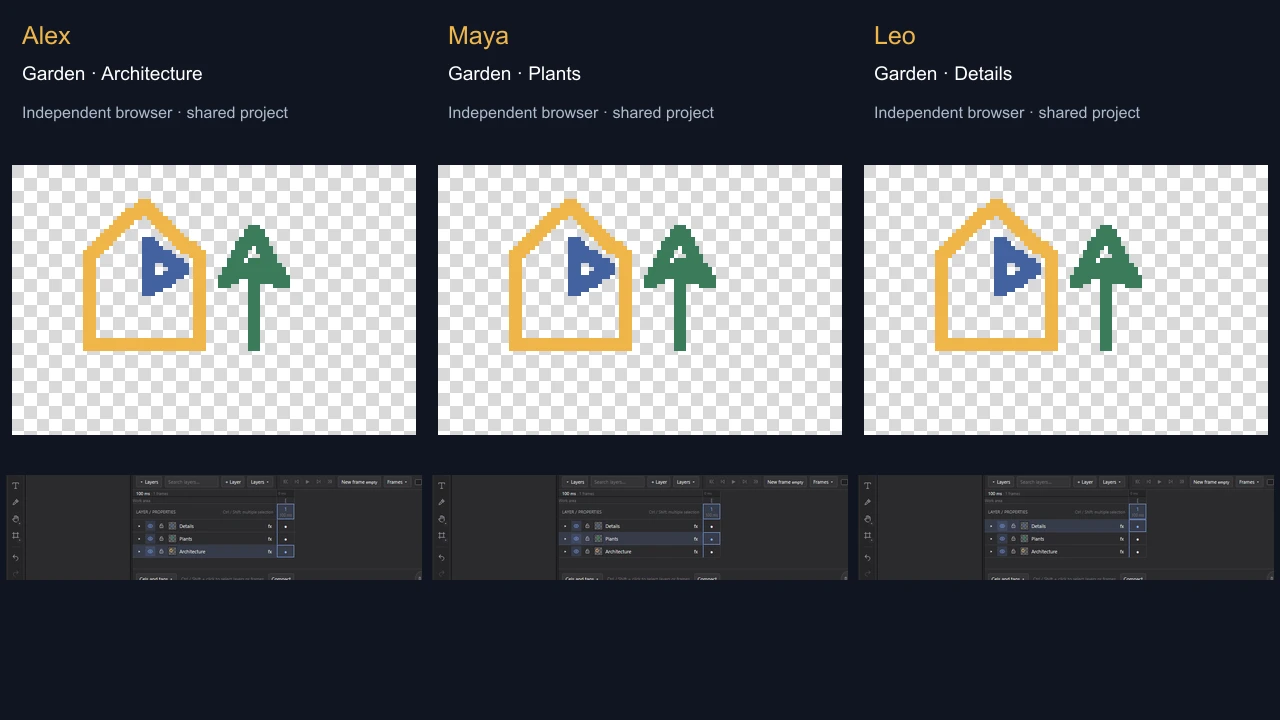
Alex, Maya and Leo open Garden in independent browsers. Alex selects Architecture, Maya Plants and Leo Details. Each draws a different part. The three views receive the combined result while retaining their own active layer and colour. Agree on the parts first; different layers reduce accidental edits to another person’s drawing.
Check: The house, plant and flag coexist across the three sessions.
Work in different project documents
A shared project can contain several Drawing or Tilemap documents. Alex opens Garden, Maya Props and Leo Colour studies. Each document keeps its own artwork while remaining part of the same project. Choose another document tab when you want to review it; opening a different document is separate from hiding a layer.
Check: Each document receives only the edits made in that document.
Undo your edit without removing theirs
After all three draw in Garden, Alex uses Undo. The architecture stroke is removed while Maya’s plant and Leo’s flag remain. Redo restores the house. Undo follows the local artist’s operation history; it is different from restoring a project revision for everyone. Inspect the shared result before a large recovery.
Check: Undo and Redo affect the intended own stroke.
If something does not work
We opened different copies
Check the online project and document names in every session. A local folder or exported backup is not the active shared room. Agree on the document and layers before painting.