Choose the visible map region and the take clock. The editor zoom and the character pose durations are independent controls.
You will learn
- Set the camera crop
- Set the take clock separately
- Review the composition during playback
Set the camera crop
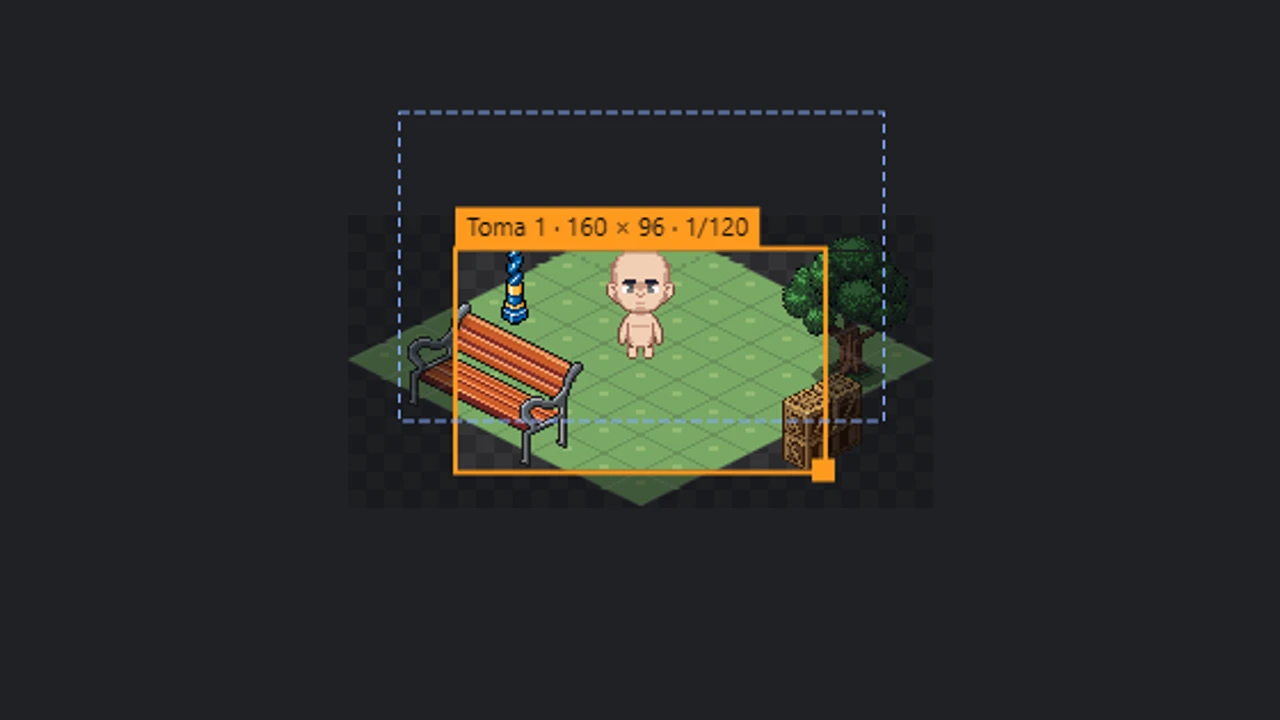
Open Take. Set Camera X to 48, Camera Y to 16, Width to 160 and Height to 96. The gold frame is a 160 × 96 crop in map pixels. The darkened surroundings remain in the map but are outside the take. Changing the camera does not move the props or actor.
Check: The gold frame matches the chosen crop.
Set the take clock separately
The first character automatically proposes its source pose rhythm for an empty take. For finer travel, set Each frame · ms to 33. A 120-frame take then lasts 3.96 seconds, around 30 take frames per second. The imported walking poses keep their original durations; this control does not generate new hand-drawn leg poses.
Check: Movement has finer recorded time steps while the walking artwork remains unchanged.
Review the composition during playback
Replay a recorded track with the camera frame visible. Check the actor at both edges, the feet near props and the end of the performance. Zooming the editor only changes your inspection view; use the camera fields or Take camera tool to change the actual crop. Save before converting or exporting the take.
Check: The performance stays readable inside the intended frame.
If something does not work
The actor does not respond to the keyboard
Select the actor, choose Rehearse or Record actor and give the map keyboard focus. A text field must not be receiving the movement keys. Check that When walking has an assigned action and the character has its directional clips.