
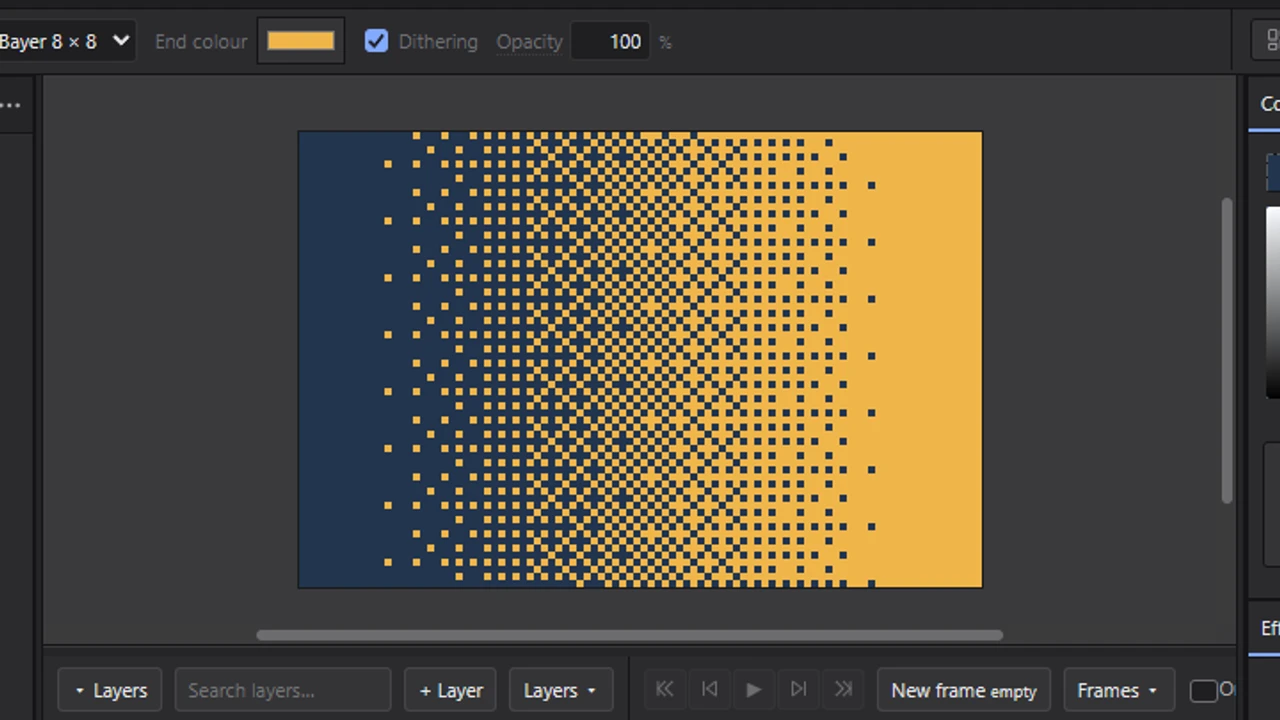
Compare the texture of seven two-colour patterns, keeping the same drag and endpoint colours.
You will learn
- Bayer: an evenly dispersed pattern
- Clustered dots
- Diamonds
Bayer: an evenly dispersed pattern
Choose Gradient, a dark blue starting colour and a gold End colour. Enable Dithering, choose Bayer and an 8 × 8 matrix. Drag left to right across a blank canvas. Only the two chosen colours are interleaved. Changing 2 × 2, 4 × 4 and 8 × 8 changes the repeated threshold cell, not the canvas resolution.
Check: Both ends keep their chosen colours and the centre contains a dispersed pattern.
Clustered dots
Undo the first gradient. Select Clustered dots with 8 × 8 and repeat the same drag. Pixels grow together in small groups instead of being dispersed like Bayer. Inspect the middle and both ends. A larger repeating cell makes the grouping more visible; it does not add a third paint colour.
Check: The transition forms compact dot groups.
Diamonds
Undo, choose Diamonds at 8 × 8 and draw again. The grouping follows diamond-shaped neighbourhoods rather than circular ones. Compare at a close integer zoom, then at actual size. Use the pattern when its geometric texture supports the material instead of obscuring the silhouette.
Check: The texture differs from clustered dots while retaining both endpoint colours.
Horizontal lines
Undo and choose Horizontal lines. Keep the 8 × 8 size and the left-to-right drag. The line orientation comes from the selected pattern, while the gradient direction still follows your drag. Compare wide and narrow transitions before applying it to a sky, floor or fabric.
Check: The repeated texture contains horizontal bands.
Vertical lines
Choose Vertical lines after undoing. Repeat the same drag and compare with the horizontal example. The rows become columns, even though your gesture still runs left to right. For a small sprite, check whether the striping remains readable at 100% zoom.
Check: The pattern contains vertical strips.
Diagonal lines
Undo and choose Diagonal lines. The repeating threshold follows diagonals inside the matrix. It is independent of the Isometric guide: selecting this pattern does not snap a gradient to 2:1. Make a selection first if only one face of an object should receive the texture.
Check: Diagonal strips are visible in the transition.
Stable noise
Undo and choose Stable noise. It uses a fixed distribution, so repeating the same settings and drag produces the same pixels. It is not an animated noise filter. Compare the result against Bayer at actual size. Disable Dithering when you want intermediate blended colours instead of a two-colour texture; Radial changes the gradient spread with any selected pattern.
Check: Repeating the same operation gives the same noise pattern.
If something does not work
The pattern controls are disabled
Enable Dithering. Pattern and matrix size are only used when the gradient alternates the two endpoint colours. They do not affect a smooth blended gradient.