Set up the artist identity other people see and manage the separate private account controls.
You will learn
- Explore the artist showcase
- Edit the public biography
- Save complete public URLs
Explore the artist showcase
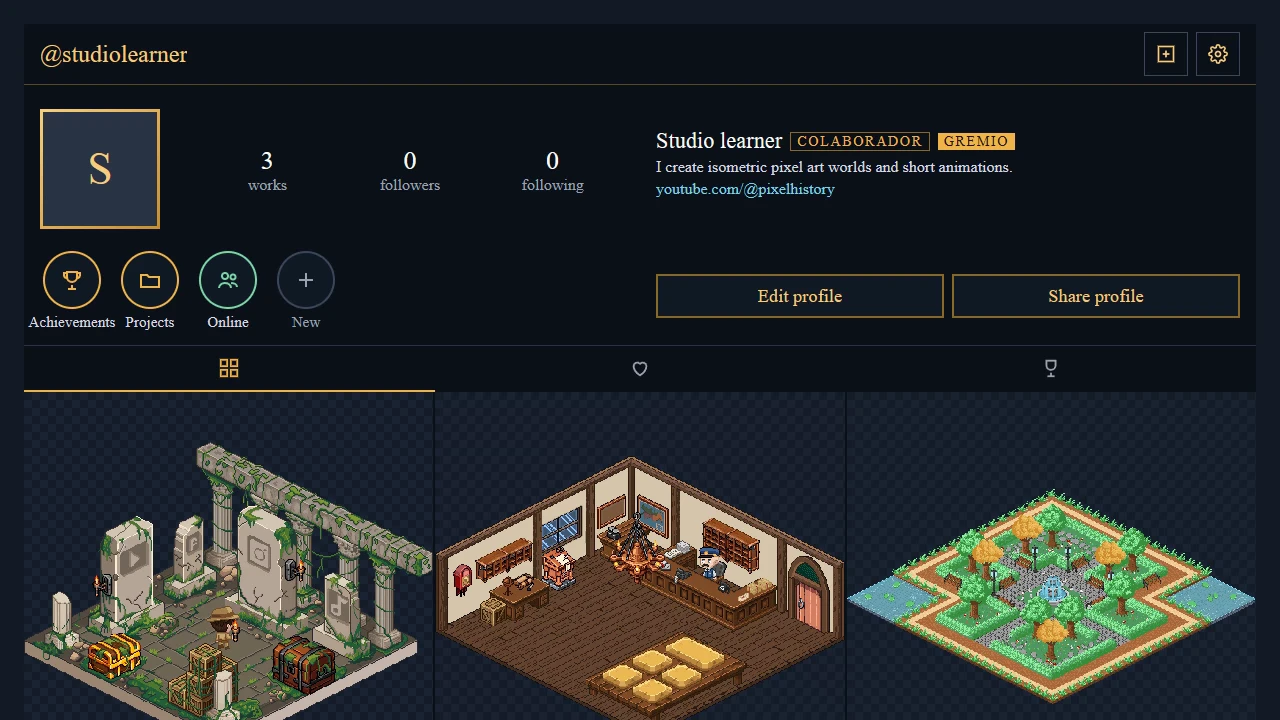
Open Profile. Review your identity, biography, public links and artwork gallery. My works, Favourites and Achievements organise different content; they are separate from the editable projects in Studio. This demonstration profile uses original Studio artwork and fictional account data.
Check: The gallery and profile sections are identifiable.
Edit the public biography
Open the profile gear, then Public profile and links. Write a short biography about what you create and save. Return to Profile to check the saved text. Edit profile also offers identity settings such as name and picture; use the public profile section for biography and public links.
Check: The showcase displays the biography you saved.
Save complete public URLs
Enter complete YouTube and website URLs, then save. Check each visible address before sharing. Verification is a separate status and process; saving a URL does not create a verified badge. The public profile settings also let you choose whether to appear in discovery.
Check: The saved URLs are complete and their verification status is clear.
Share the public artist link
On desktop choose Share profile to copy its public link. A supported phone can open the native share sheet. The link identifies the public artist page; it does not share local folders, editable Studio projects or editing permission. Check the public page before using the link in your social profiles.
Check: The public profile URL is copied.
If something does not work
The profile is absent from discovery but its link still opens
Discovery visibility controls listing, not a secret access restriction on the public URL. Check the saved profile from View profile and keep private account information out of the public biography and links.