Create two keys by hand, one property at a time. A filled ball with a white mark makes each result visible.
You will learn
- Position X: create the first keys
- Scale: grow around the anchor
- Rotation: use a visible landmark
Position X: create the first keys
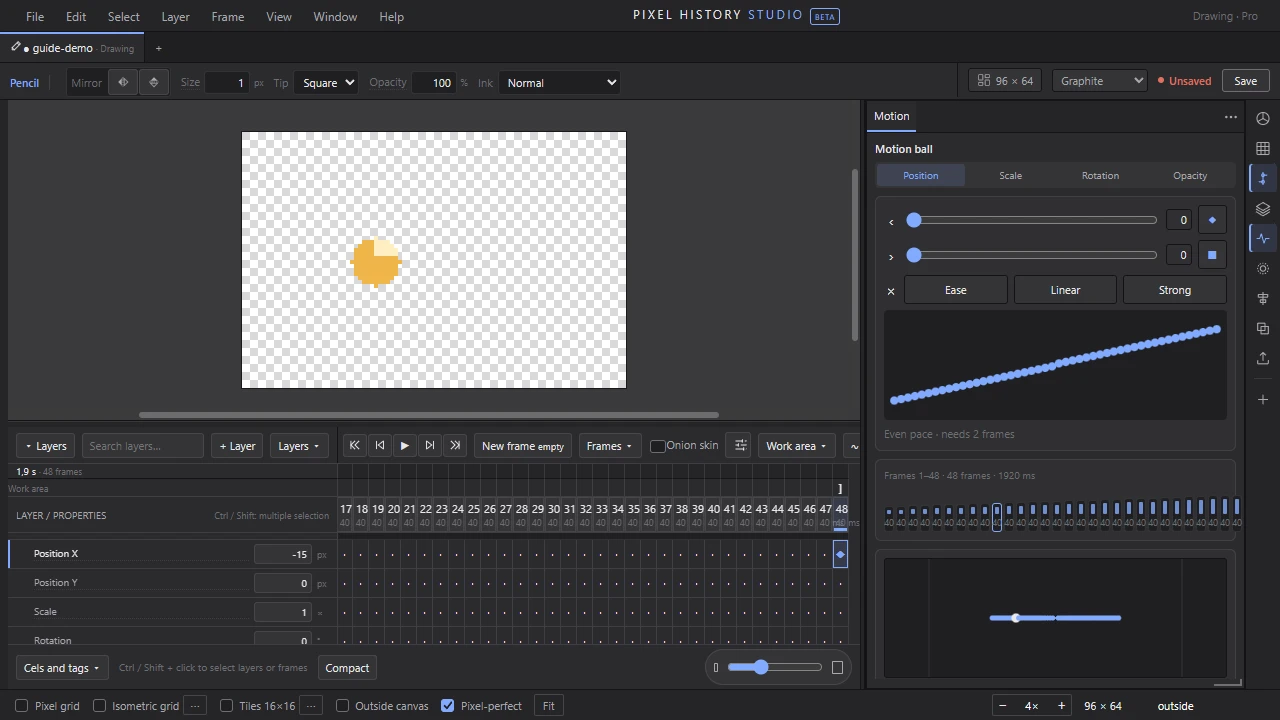
Prepare the same ball across 48 frames. Select Frame 1, enable Advanced animation and expand Properties of Motion ball. Set Position X to −24 px and click Set key of Position X on 1. Select Frame 48 and enter 24 px. Because that property already has a key, changing its value creates the second key. Play the result.
Check: Two diamonds define the journey and intermediate frames move the ball.
Scale: grow around the anchor
Start from a clean copy. On Frame 1 set Scale to ×1 and click its key diamond. Select Frame 48 and enter ×2.5. Play and compare the centre and outer silhouette. Scaling does not enlarge the canvas or permanently resample the source drawing. Large scale steps are visible in pixel art; inspect the final export at its intended size.
Check: The entire ball grows around the current anchor.
Rotation: use a visible landmark
Use a fresh copy with the white mark intact. Put a Rotation key of 0° on Frame 1 and 270° on Frame 48. Play: the white mark turns with the ball. A perfectly uniform circle can rotate without appearing to change, which is why a landmark matters. Use the Motion anchor controls to change the pivot.
Check: The white mark rotates with the ball.
Opacity: fade without erasing
Start from the unmodified ball. Put an Opacity key of 100% on Frame 1 and 10% on Frame 48. Play over the checkerboard. The whole layer becomes more transparent; the source pixels remain available. Keep the background on a separate layer when you want only the character or effect to fade.
Check: The ball fades and returns intact when you revisit Frame 1.
If something does not work
My curve looks like a straight line
Use enough frames between the two keys. Extra keys inside the run split it into shorter runs. Select the intended property and inspect the frame spacing, not only the graph.