Build related colours from a base and choose a ramp that describes the material and lighting.
You will learn
- Follow a colour or hold the base
- Compare relationships around one base
- Read and save the pixel ramp
Follow a colour or hold the base
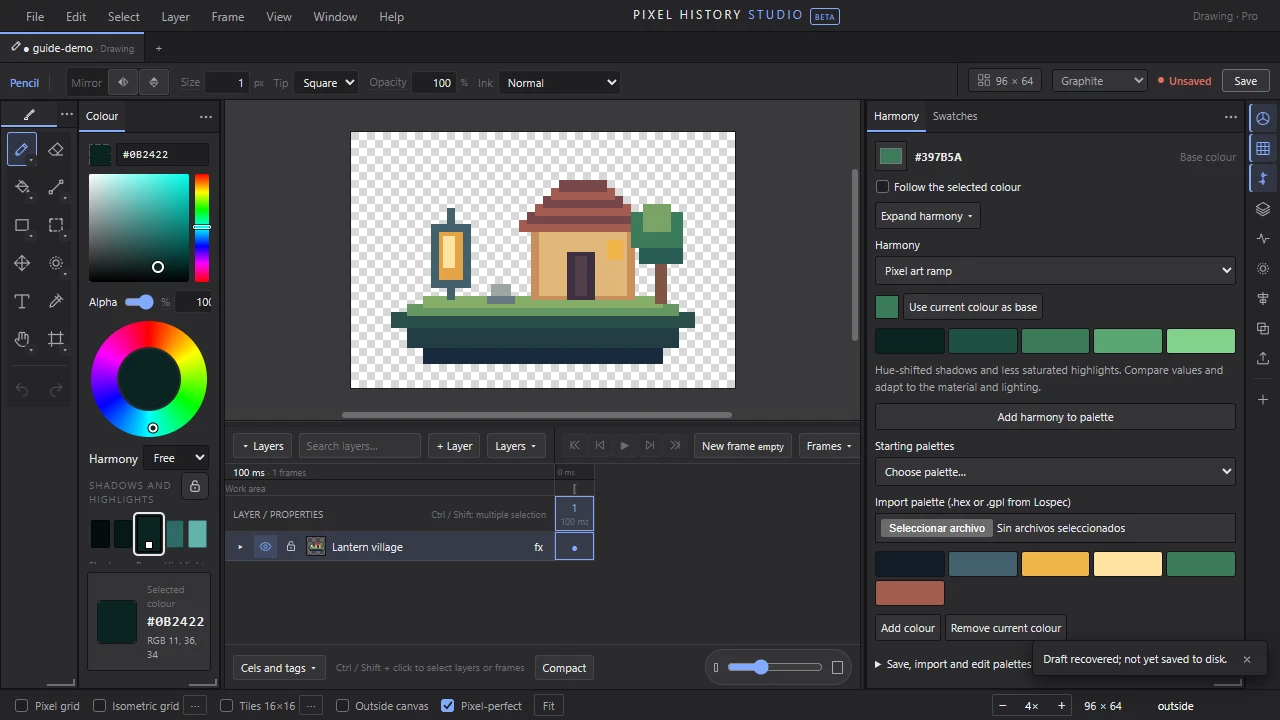
Open Harmony. With Follow the selected colour enabled, select the green project swatch: the harmony base updates. Disable Follow before choosing generated swatches if you want that base to stay fixed. Otherwise each chosen tone becomes the starting point of a new harmony.
Check: Generated swatches can be sampled without changing the fixed base.
Compare relationships around one base
Keep the gold base and compare Complementary, Analogous and Triad in the Harmony selector. Look at which hue relationships change. This generates proposed colours; existing canvas pixels are unchanged. Choose a relationship to support the subject rather than adding every proposal to the drawing.
Check: The swatches change while the source art remains intact.
Read and save the pixel ramp
Select Pixel ramp. Its order is shadows → base → highlights. Shadows can shift hue; highlights can reduce saturation. Keep Follow disabled while sampling, then use Add harmony to palette to retain the swatches. A ramp proposes colours; you decide the lighting direction and which face receives each tone.
Check: The project palette contains the chosen ramp.
Apply light, base and shadow to faces
Use the outlined cube with three enclosed faces. Choose the light end of Pixel ramp and fill the upper face; choose its centre for the left face and its dark end for the right. The video uses a deliberate top-left light. Compare the three values with the pointer away. Reverse the assignments if your lighting comes from another direction.
Check: The three faces remain readable with a consistent light direction.
If something does not work
The base changes whenever I choose a generated colour
Turn Follow the selected colour off while exploring the ramp. Turn it back on when you want the palette base to track your paint colour. Add harmony to palette stores swatches without repainting existing pixels.