Read expressive curves on a filled ball, with room around the keys and enough frames for each change of direction.
You will learn
- Anticipation: pull back before leaving
- Overshoot: pass and return
- Bounce as a curve
Anticipation: pull back before leaving
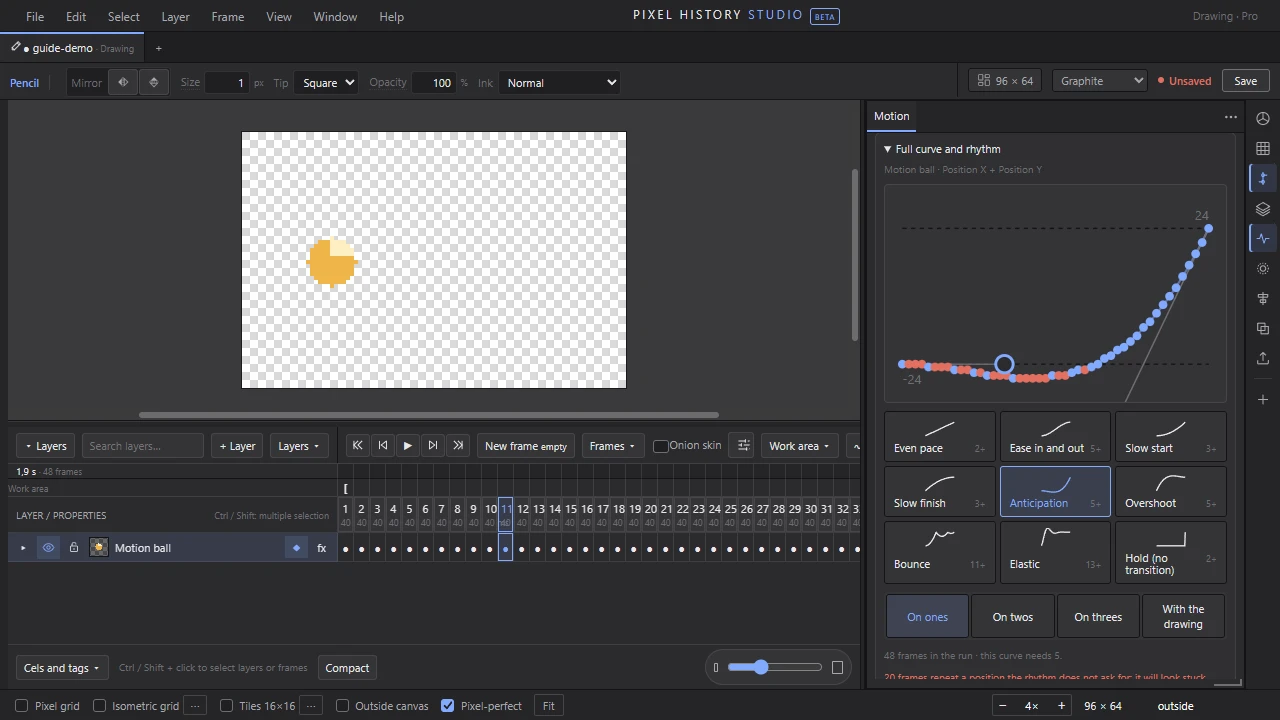
Use the same 48-frame horizontal run from the easing lesson. Leave clear space behind the first key. Open Full curve and rhythm and choose Anticipation. The curve temporarily goes below its starting value: the ball takes a small step backwards before travelling forwards. This is an intentional preparation, not a reversed track.
Check: The backward movement is visible before departure.
Overshoot: pass and return
Choose Overshoot on the same keys. Leave extra room beyond the final position. Play the arrival: the ball passes the target and returns to it. The final key still defines the destination. If the shape disappears briefly, enlarge the canvas or reduce the distance instead of moving the key to compensate for clipping.
Check: The ball settles exactly on the final key.
Bounce as a curve
Choose Bounce inside Curve shape. This distributes the journey between two keys with repeated arrivals. It is separate from the Bounce preset, which generates a positional path. Compare the endpoint values before and after choosing the curve: they stay unchanged. Use the frame count warning to avoid compressing several rebounds into too few poses.
Check: The arrival visibly bounces while the endpoint remains fixed.
Elastic and Hold
Choose Elastic and play. The ball crosses the destination several times with diminishing oscillations. Afterwards compare Hold: it stays at the first value and changes at the next key. Hold is deliberately abrupt. Save the editable keys before exporting so that these timing choices remain adjustable.
Check: Elastic oscillates around the destination.
Hold: an intentional jump
Select Hold (no transition) and replay the same run. The ball waits at its first key instead of moving through the intervening positions. It switches to the final value at the next key. Use this for sudden cuts or a held pose, not when you want a smooth slide.
Check: There are two held positions with a deliberate jump between them.
If something does not work
My curve looks like a straight line
Use enough frames between the two keys. Extra keys inside the run split it into shorter runs. Select the intended property and inspect the frame spacing, not only the graph.